又到了一年一度股東會品領取的時間,這段時間就必須花很多時間在投票跟截圖,
可能一天幾檔都還不是問題,但如果到幾十檔甚至到上百檔這花的時間可不是幾分鐘,可能要到數個小時
所以花了一點時間研究找到可以解決這繁複的手續
雖然網上有很多小程式可以幫忙解決這些問題
但畢竟要提供憑證這真的有點危險
所以還是小心為妙
以下都是免費的,所以有BUG不要太過苛求,至少目前投了幾百檔還沒遇到問題
首先要給Chrom下載tampmonkey 它可以用來修改網頁的腳本(免費的),
安裝好後點選新增腳本
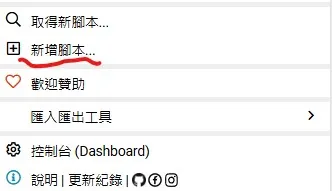
首先來處理投票的部分
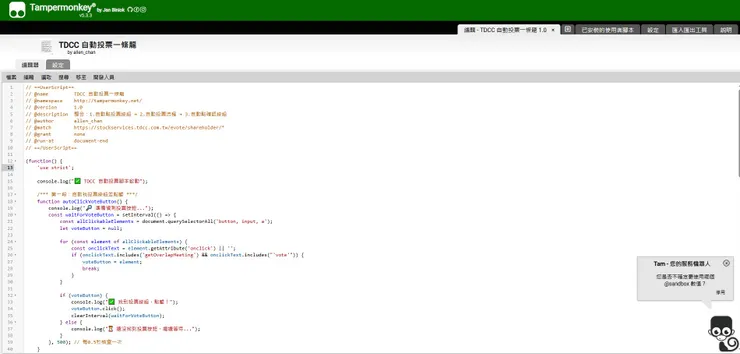
將以下的程式貼上去就好了,就完成了80%了
// ==UserScript==
// @name         TDCC 自動投票一條龍
// @namespace    http://tampermonkey.net/
// @version      1.0
// @description  整合:1.自動點投票按鈕 → 2.自動投票流程 → 3.自動點確認按鈕
// @author       allen_chan
// @match        https://stockservices.tdcc.com.tw/evote/shareholder/*
// @grant        none
// @run-at       document-end
// ==/UserScript==

(function() {
    'use strict';

    console.log("✅ TDCC 自動投票腳本啟動");

    /*** 第一段:自動找投票按鈕並點擊 ***/
    function autoClickVoteButton() {
        console.log("🔎 準備偵測投票按鈕...");
        const waitForVoteButton = setInterval(() => {
            const allClickableElements = document.querySelectorAll('button, input, a');
            let voteButton = null;

            for (const element of allClickableElements) {
                const onclickText = element.getAttribute('onclick') || '';
                if (onclickText.includes('getOverlapMeeting') && onclickText.includes("'vote'")) {
                    voteButton = element;
                    break;
                }
            }

            if (voteButton) {
                console.log("✅ 找到投票按鈕,點擊!");
                voteButton.click();
                clearInterval(waitForVoteButton);
            } else {
                console.log("⏳ 還沒找到投票按鈕,繼續等待...");
            }
        }, 500); // 每0.5秒檢查一次
    }

    /*** 第二段:偵測 voteObj 自動執行投票流程 ***/
    function autoExecuteVoteProcess() {
        console.log("🔎 準備偵測 voteObj...");
        const actions = [
            () => typeof window.voteObj !== 'undefined' && window.voteObj.checkMeetingPartner?.(),
            () => typeof window.optionAll !== 'undefined' && window.optionAll(0),
            () => typeof window.voteObj !== 'undefined' && window.voteObj.checkVote?.(),
            () => typeof window.doProcess !== 'undefined' && window.doProcess(),
            () => typeof window.voteObj !== 'undefined' && window.voteObj.ignoreVote?.(),
            () => typeof window.voteObj !== 'undefined' && window.voteObj.goNext?.(),
            () => typeof window.voteObj !== 'undefined' && window.voteObj.ignoreVote?.() && window.voteObj.goNext?.()
        ];

        let elapsedTime = 0;

        const waitForVoteObj = setInterval(() => {
            elapsedTime += 500;

            if (typeof window.voteObj !== 'undefined') {
                console.log("✅ 偵測到 voteObj,1 秒後開始投票流程");
                clearInterval(waitForVoteObj);

                setTimeout(async () => {
                    for (let i = 0; i < actions.length; i++) {
                        try {
                            const result = actions[i]();
                            if (result !== false) {
                                console.log(`✅ 已執行動作 ${i + 1}`);
                            }
                        } catch (e) {
                            console.warn(`⚠️ 動作 ${i + 1} 發生錯誤:${e.message},已跳過`);
                        }
                        await new Promise(resolve => setTimeout(resolve, 1000)); // 每步驟間隔1秒
                    }
                }, 1000);
            }
            else if (elapsedTime >= 10000) {
                console.warn("⛔ 超過10秒未偵測到 voteObj,停止等待");
                clearInterval(waitForVoteObj);
            }
            else {
                console.log("⏳ 尚未偵測到 voteObj,繼續等待...");
            }
        }, 500);
    }

    /*** 第三段:自動點擊「確認」按鈕 ***/
    function autoClickConfirmButton() {
        function findAndClickConfirmButton() {
            const buttons = document.querySelectorAll('button, input[type="button"], input[type="submit"]');

            buttons.forEach(button => {
                const onclickAttr = button.getAttribute('onclick') || '';
                const buttonText = (button.innerText || button.value || '').trim();

                if (onclickAttr.includes('doProcess()') && buttonText === '確認') {
                    console.log('✅ 找到確認按鈕,點擊');
                    button.click();
                }
            });
        }

        window.addEventListener('load', () => {
            setTimeout(findAndClickConfirmButton, 500); // 頁面載入完後延遲0.5秒執行
        });

        setInterval(findAndClickConfirmButton, 2000); // 每2秒檢查一次
    }

    /*** 主程式啟動順序 ***/
    autoClickVoteButton();
    autoExecuteVoteProcess();
    autoClickConfirmButton();

})();
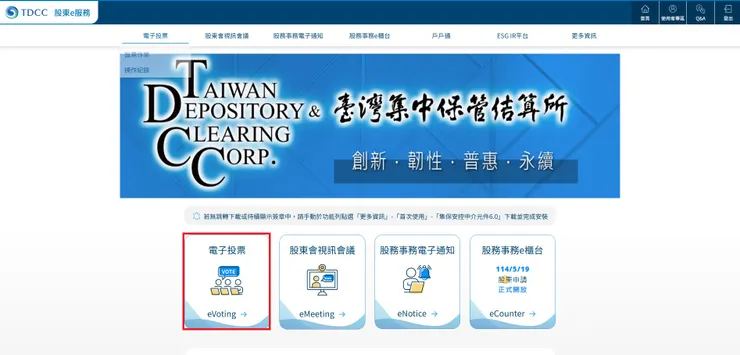
然後到集保中心的電子投票
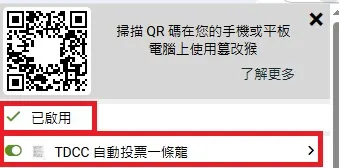
登入後把剛剛的程式啟動,可以看到已啟動,然後下面那個要ON起來
然後進到股票的頁面可以看到相當多待投票的標的
此時只要refresh網頁或是按F5,程式應該就會開始執行
等到全部執行完畢,那些需要投票的標的都投完,就可以將程式關閉
投完了接下來就是要做截圖動作,
在畫面中會看到一個下載持有股東會清單,可以先下載這個excel,然後這些股票代號我會全部複製出來
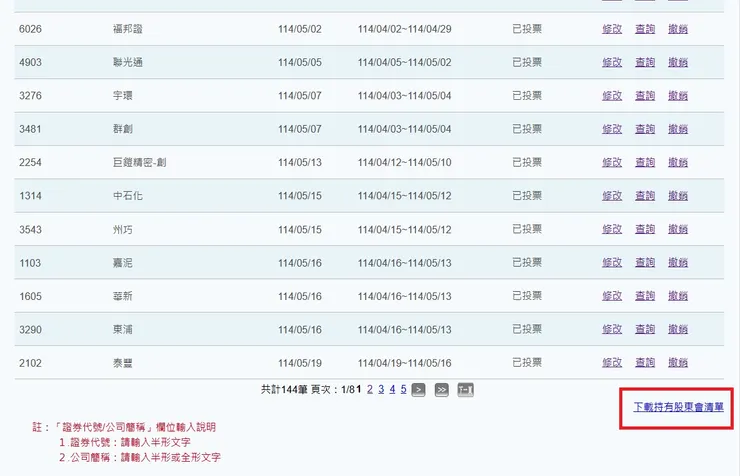
然後格式為下面const stockIds=[XXXX]
把需要截圖的股票代號用一樣的格式整理出來
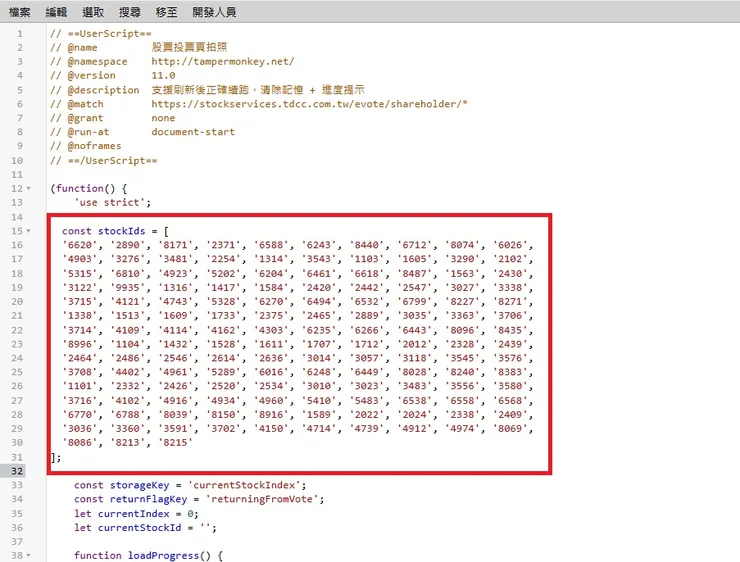
然後一樣新增一個腳本,程式在下面
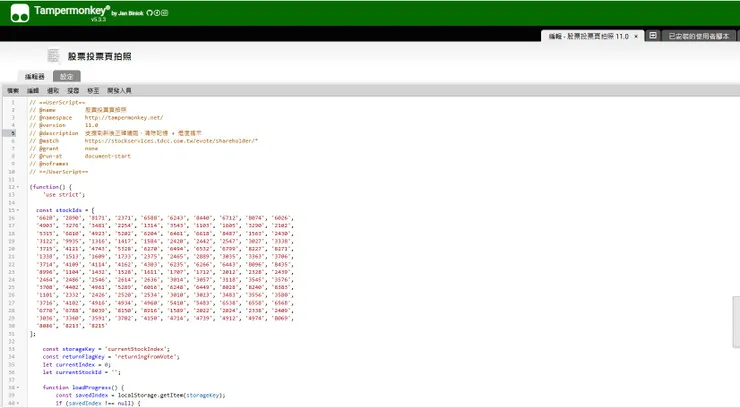
20260408 截圖程式更新
// ==UserScript==
// @name         股票投票頁拍照
// @namespace    http://tampermonkey.net/
// @version      11.0
// @description  支援刷新後正確續跑,清除記憶 + 進度提示
// @match        https://stockservices.tdcc.com.tw/evote/shareholder/*
// @run-at       document-end
// @grant        none

// @noframes
// ==/UserScript==

(function() {
    'use strict';
console.log("Tampermonkey script is running");
const stockIds = ['6531','3122'];

    const storageKey = 'currentStockIndex';
    const returnFlagKey = 'returningFromVote';
    let currentIndex = 0;
    let currentStockId = '';

    function loadProgress() {
        const savedIndex = localStorage.getItem(storageKey);
        if (savedIndex !== null) {
            currentIndex = parseInt(savedIndex, 10);
            console.log(`📂 載入記憶 currentIndex = ${currentIndex}`);
        } else {
            currentIndex = 0;
            console.log('🆕 沒有記憶,從頭開始');
        }
    }

    function saveProgress() {
        localStorage.setItem(storageKey, currentIndex.toString());
        console.log(`💾 儲存進度:第 ${currentIndex + 1} 筆`);
    }

    function clearProgress() {
        localStorage.removeItem(storageKey);
        sessionStorage.removeItem(returnFlagKey);
        alert('✅ 已清除記憶!請手動重新整理頁面重新開始');
        console.log('🧹 清除記憶完成');
        updateProgressText('已清除記憶');
    }

    function startProcess() {
        if (currentIndex >= stockIds.length) {
            console.log('🎉 全部股票處理完成,腳本停止');
            clearProgress();
            updateProgressText('✅ 全部完成');
            return;
        }

        currentStockId = stockIds[currentIndex];
        console.log(`🔎 開始處理第 ${currentIndex + 1} 筆:${currentStockId}`);
        updateProgressText(`第 ${currentIndex + 1} / ${stockIds.length} 筆:${currentStockId}`);

        const input = document.querySelector('input[name="qryStockId"]');
        if (input) {
            console.log('✅ 找到輸入框,填入股票代號並查詢');
            input.value = currentStockId;
            qryByStockId();
            waitForGetOverlapMeetingButton();
        } else {
            console.log('🎯 找不到輸入框(推測在投票頁),直接截圖');
            captureVotePage(currentStockId);
        }
    }

function waitForGetOverlapMeetingButton(retryCount = 0) {
        const currentMeetingDate = getCurrentMeetingDate();
        if (!currentMeetingDate) {
            console.log('⚠️ 找不到會議日期,500ms後重試');
            setTimeout(() => waitForGetOverlapMeetingButton(retryCount + 1), 500);
            return;
        }

        console.log(`📅 抓到會議日期:${currentMeetingDate}`);

        const buttons = Array.from(document.querySelectorAll('button, a'));
        let foundQryButton = false;

        for (const button of buttons) {
            const onclickAttr = button.getAttribute('onclick');
            if (onclickAttr) {
                const match = onclickAttr.match(/getOverlapMeeting\('([^']+)','(qry)','([^']+)'\)/);
                if (match) {
                    const stockCode = match[1];
                    const actionType = match[2];
                    const meetingDate = match[3];

                    console.log(`👉 掃描到按鈕:證券代號=${stockCode},動作=${actionType},會議日期=${meetingDate}`);

                    if (stockCode === currentStockId && actionType === 'qry' && meetingDate === currentMeetingDate) {
                        console.log(`✅ 找到正確按鈕,點擊 股票代號 ${stockCode}`);
                        //realClick(button);
                        getOverlapMeeting(stockCode,'qry',meetingDate);
                        setTimeout(() => waitForBarcodesAndCapture(currentStockId), 2000);
                        foundQryButton = true;
                        break;
                    }
                }
            }
        }

        if (!foundQryButton) {
            if (retryCount >= 10) {
                console.log(`⚠️ 找不到符合條件的 qry 按鈕(股票代號 ${currentStockId}),自動跳過!`);
                currentIndex++;
                saveProgress();
                setTimeout(startProcess, 1000);
            } else {
                console.log(`⌛ 還沒找到正確 qry 按鈕,500ms後再試 (第${retryCount+1}次)`);
                setTimeout(() => waitForGetOverlapMeetingButton(retryCount + 1), 500);
            }
        }
    }

    function getCurrentMeetingDate() {
        const dateCell = document.getElementsByClassName('u-inline u-width--30 u-mobile_width--100 u-v_align--middle')[0];
        if (dateCell) {
            const text = dateCell.textContent.trim(); // 例如 114/05/27
            const parts = text.split('/');
            if (parts.length === 3) {
                const year = parseInt(parts[0], 10) + 1911;
                const month = parts[1].padStart(2, '0');
                const day = parts[2].padStart(2, '0');
                return `${year}${month}${day}`; // 轉成 20250527
            }
        }
        return null;
    }

    function captureVotePage(stockIdForCapture) {
        html2canvas(document.body).then(canvas => {
            const link = document.createElement('a');
            link.href = canvas.toDataURL('image/png');
            link.download = `${stockIdForCapture}_vote.png`;
            link.click();
            console.log(`📸 截圖完成:${stockIdForCapture}_vote.png`);

            setTimeout(() => {
                console.log('↩️ 返回上一頁...');
                sessionStorage.setItem(returnFlagKey, 'true'); // 設定回來的旗子
                back();
            }, 1000);
        }).catch(error => {
            console.error('❌ 截圖失敗:', error);
        });
    }

    function addResetButton() {
        const btn = document.createElement('button');
        btn.textContent = '🧹 清除記憶';
        btn.style.position = 'fixed';
        btn.style.bottom = '70px';
        btn.style.right = '20px';
        btn.style.zIndex = '99999';
        btn.style.padding = '10px 15px';
        btn.style.background = '#ff5555';
        btn.style.color = 'white';
        btn.style.border = 'none';
        btn.style.borderRadius = '10px';
        btn.style.cursor = 'pointer';
        btn.style.boxShadow = '0px 0px 8px rgba(0,0,0,0.3)';
        btn.onclick = clearProgress;
        document.body.appendChild(btn);
        console.log('✅ 插入清除記憶按鈕');
    }

    function addProgressBox() {
        const box = document.createElement('div');
        box.id = 'progressBox';
        box.style.position = 'fixed';
        box.style.bottom = '20px';
        box.style.right = '20px';
        box.style.zIndex = '99999';
        box.style.padding = '10px 15px';
        box.style.background = '#333';
        box.style.color = '#fff';
        box.style.fontSize = '14px';
        box.style.borderRadius = '10px';
        box.style.boxShadow = '0px 0px 8px rgba(0,0,0,0.3)';
        box.textContent = '初始化中...';
        document.body.appendChild(box);
        console.log('✅ 插入進度提示');
    }

    function updateProgressText(text) {
        const box = document.getElementById('progressBox');
        if (box) {
            box.textContent = text;
        }
    }

    function waitBodyReady(callback) {
        if (document.body) {
            callback();
        } else {
            console.log('⏳ 等待 document.body 出現...');
            setTimeout(() => waitBodyReady(callback), 500);
        }
    }

    waitBodyReady(() => {
        console.log('🚀 Body 出現,開始初始化');
        loadHtml2Canvas(() => {
            addProgressBox();
            addResetButton();
            loadProgress();

            const isReturning = sessionStorage.getItem(returnFlagKey);
            if (isReturning === 'true') {
                console.log('🔄 偵測到是返回頁面,切換下一筆');
                sessionStorage.removeItem(returnFlagKey);
                currentIndex++;
                saveProgress();
            }

            startProcess();
        });
    });

    function loadHtml2Canvas(callback) {
        const script = document.createElement('script');
        script.src = 'https://cdn.jsdelivr.net/npm/[email protected]/dist/html2canvas.min.js';
        script.onload = callback;
        document.head.appendChild(script);
    }

})();
新增完後一樣做儲存,然後將程式開啟,變成已啟用
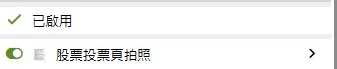
然後到股票那一頁,按refresh或是F5,此時應該就會看到源源不絕的圖片下載
然後等下載完就可以關閉程式
這樣真的省很多時間
而且不需要提供憑證給陌生人,避免不必要的危險
如果有幫助能否給一個掌聲 謝謝了