In the architecture industry, visual presentation often plays a major role in how a project is received. Whether you’re a designer, an architecture studio, or a home builder, clean and consistent renderings can significantly elevate the professionalism of your work.
Recently, I was tasked with updating around 30 house designs created over many different years. These models were built using different software versions, and the original renders came from various rendering engines. As a result, the overall visual style was extremely inconsistent.For our new online catalog, I needed to unify everything into a single, coherent visual language.That’s when I started testing ReRender AI, hoping to find a fast, high-quality solution that could maintain visual consistency across an entire collection of projects.
⭐ First Impressions: Surprisingly Capable
Even though I’ve only just begun working with ReRender AI, the results have been better than expected. It’s able to take older models and renders—created with completely different tools—and output clean, unified images that match the style I’m aiming for.
A few things stood out early on:
- Strong cross-project consistency
- Realistic, clean, unified results
- A noticeable reduction in manual adjustment and re-rendering time
For architectural visualization, having an AI reliably handle stylistic uniformity is a significant shift. And so far, ReRender AI has shown promising stability and maturity in this area.
1. Cross-Project Consistency
One of the biggest challenges in my current task is unifying renders from multiple projects, spanning different years and workflows, into a consistent visual style.ReRender AI performs surprisingly well here.
It maintains a cohesive aesthetic across completely unrelated models, helping me turn a set of mixed, inconsistent visuals into a consistent catalog.
For this project, which involves 30 designs and over a hundred final images, this has been extremely helpful:
- I don’t have to manually fine-tune a visual style for each project
- Different models and camera angles produce consistent-looking renders
- The entire catalog now shares a coherent brand identity
In short, ReRender AI makes cross-project unification not only possible, but efficient.

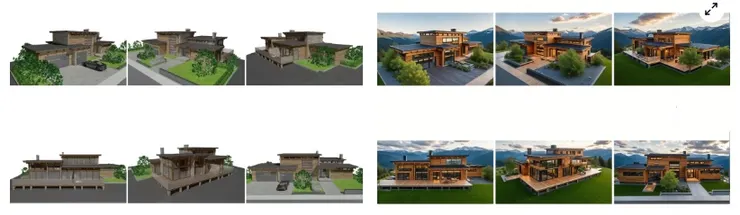
“Original → Final”
The image on the left shows the original renderings — a mix of various styles created over the years.
The image on the right shows the updated results with a clean, unified visual style.
2. Scene Locking
When re-rendering, the system keeps various scene elements stable, such as:
- Vehicle type and placement
- Trees, landscaping, and foreground elements
- Sun direction and shadow placement
- Seasonal appearance (e.g., keeping winter consistent)
While adjusting the seasonal atmosphere, I found that ReRender AI maintains the chosen season across different views. I don’t end up with one image in autumn, another in winter, and another suddenly looking like spring.
For producing series-based architectural visuals—or keeping all outputs in the same seasonal tone—this level of stability is particularly useful.

3. Material & Lighting Control
Within the system, I can adjust:
- Material brightness and color tone
- Lighting direction and intensity
- Preset environments (warm afternoon, overcast, sunset, etc.)
It’s not as detailed as a full traditional renderer, but for fast iterations and batch output, the level of control is more than enough. Most importantly, it lets me keep all images within the lighting and color range I’m aiming for.

Conclusion
Overall, ReRender AI has helped me significantly reduce repetitive work and manual adjustments during this large task of updating old projects and unifying their visual style. Its capabilities in cross-project consistency, scene stability, seasonal control, and material and lighting adjustments have made it much easier to organize a wide range of architectural models from different sources.
Of course, every tool has its ideal use cases—it’s not a universal replacement for every part of the workflow. But for me, it has become a tool that greatly speeds up my visualization process and improves consistency across multiple projects. It’s something I’m likely to keep using in future architectural work.
That’s my experience so far—sharing it here in case it’s helpful for others working in architectural visualization.
ReRender:https://rerenderai.com/